Open the Paddocks page
From the home screen, find the Paddocks tile on the Exporter Dashboard.
01
Log in to FodderSafe as an Exporter Staff.
02
Wait for the Home page to appear, then look for the Exporter Dashboard section.
03
Click on the Paddocks tile (marked by the paddock icon).
Step 1 · Click image to zoom
Initialize a New Paddock Entry
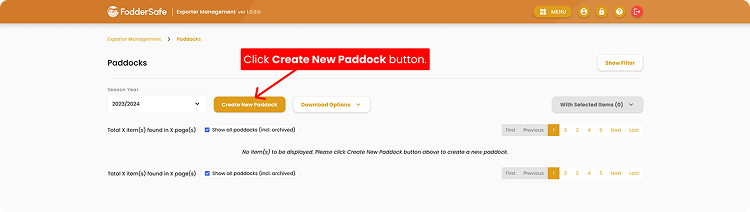
On the Paddocks page, kick off a new entry with the orange button.
01
Confirm you're on the Paddocks page (notice breadcrumb at top).
02
Click the Create New Paddock button — a form will appear.
Step 2 · Click image to zoom
Complete and Save Your Paddock
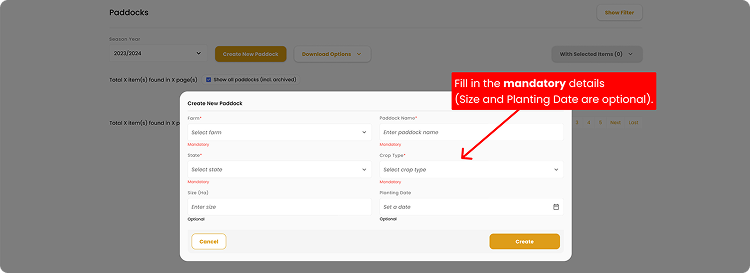
Fill out the required paddock information to finalize your new paddock.
01
Fill in your Paddock Details. Farm, Paddock Name, State, and Crop Type are mandatory to fill, while Size and Planting Date are optional.
02
Click Create to continue.
Step 3 · Click image to zoom