Open the Spray Records page
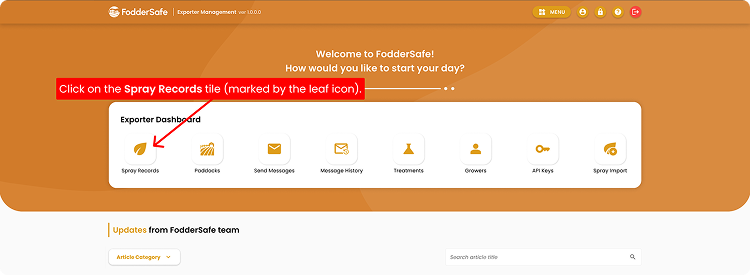
From the home screen, find the Spray Records tile on the Exporter Dashboard.
01
Log in to FodderSafe as an Exporter Staff.
02
Wait for the Home page to appear, then look for the Exporter Dashboard section.
03
Click on the Spray Records tile (marked by the leaf icon).
Step 1 · Click image to zoom
Adjust Season & Open Filter
Narrow down your spray records by selecting a specific season or opening the filter menu.
01
Confirm you're on the Spray Records page (notice breadcrumb at top).
02
You can change the displayed results by clicking the Season Year tab.
03
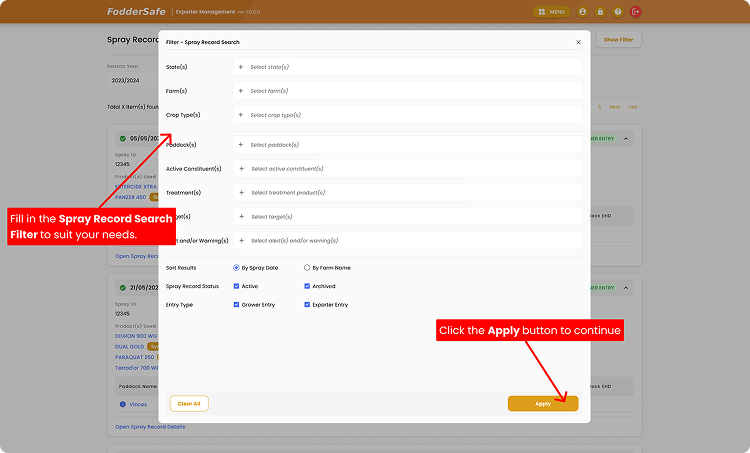
You can also open the spray records filter by clicking Show Filter button.
04
A filter pop-up will appear.
Step 2 · Click image to zoom
Apply Your Custom Filters
Customize the filter fields to match your criteria and apply them to update your list.
01
On the Spray Record Search filter, you will see a variety of filter options. Fill in and adjust the filters to suit your needs.
02
After setting your filters, click Apply to continue.
03
The spray records list will change to match your applied filters. 🎉
Step 3 · Click image to zoom