Open the Treatments page
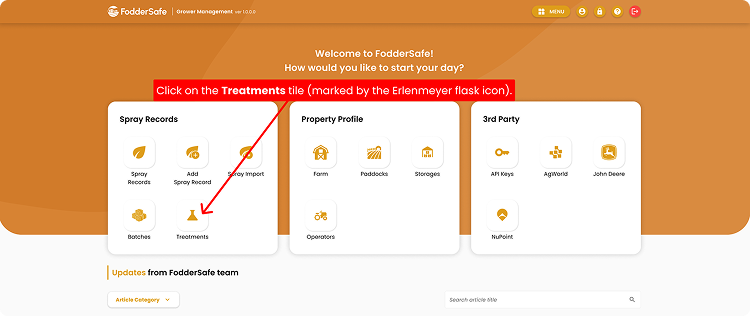
From the home screen, find the Treatments tile on the Grower Dashboard.
01
Log in to FodderSafe as an Grower.
02
Wait for the Home page to appear, then look for the Grower Dashboard section.
03
Click on the Treatments tile (marked by the Erlenmeyer flask icon).
Step 1 · Click image to zoom
Search for Product Name
Easily find and filter your treatment products using multiple search criteria.
01
Confirm you're on the Treatments page (notice breadcrumb at top).
02
Click the Product Name(s) search bar and type in what you're looking for.
03
A list of products matching your search will appear.
Looking for something more specific?
- You can also search treatment product by Manufacturer, Active Constituents, or Target.
- Simply click the one of the tabs next to Search by Name and select from the available options.
Step 2 · Click image to zoom
Open Product Details
View in-depth product information and essential compliance rules instantly.
01
Locate your product from the list, then click Open Product Details.
02
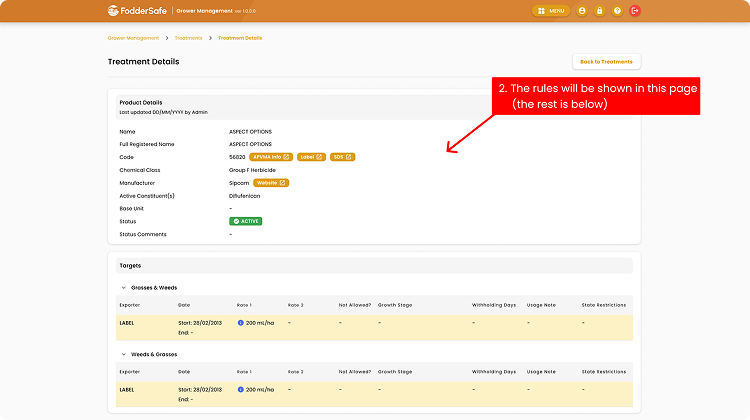
Explore its specific rules and guidelines with ease. 🎉
Step 3 · Click image to zoom